How to Create Press-On Nail Product Photos with AI
Selling press-on nails online? Your product photos can make or break a sale. But hiring a hand model and photographer is expensive and time-consuming. With Try My Nails, you can generate professional product photos in under 2 minutes — no camera needed.
TL;DR — Upload a photo of your press-on nails to Try My Nails, choose a skin tone and hand pose, and the AI generates professional product photos in under 2 minutes. No camera, hand model, or studio needed — saving 80–95% vs. traditional photography.
What You'll Need
- A clear photo of your press-on nail design (on a plain background works best)
- A free Try My Nails account
Step-by-Step Tutorial
Take a clear photo of your press-on nails against a clean background. Lay them out flat so the design is fully visible.
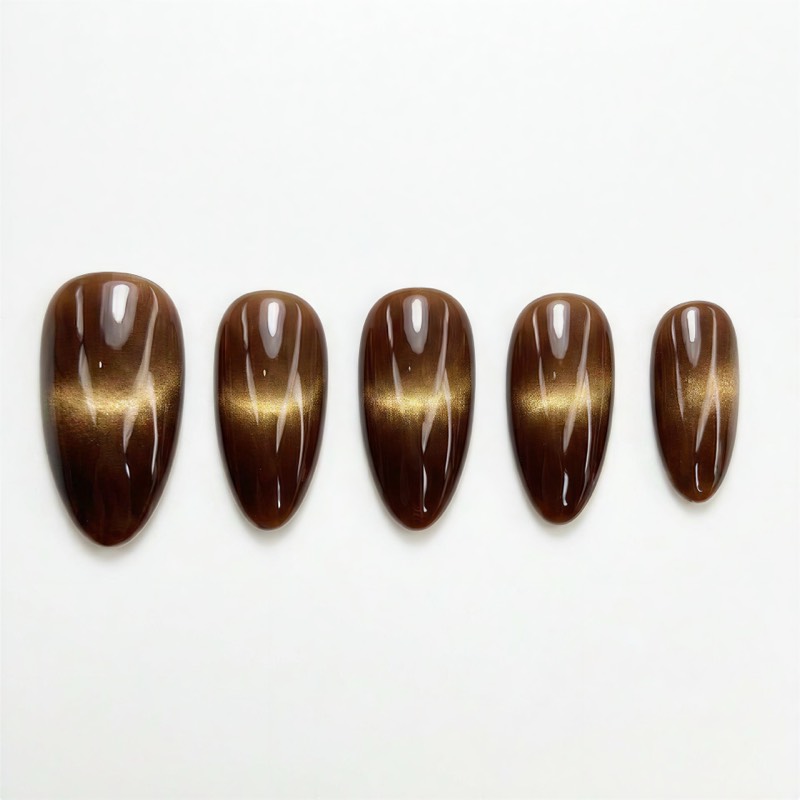
Select a skin tone, hand pose, and background color. Match your brand aesthetic or create variety for your listings.
Hit Generate and the AI places your nail design on realistic hand models. You can generate up to 4 different poses at once.
Download high-resolution photos ready for your Etsy listings, TikTok Shop, Instagram posts, or any e-commerce platform.
See the Results
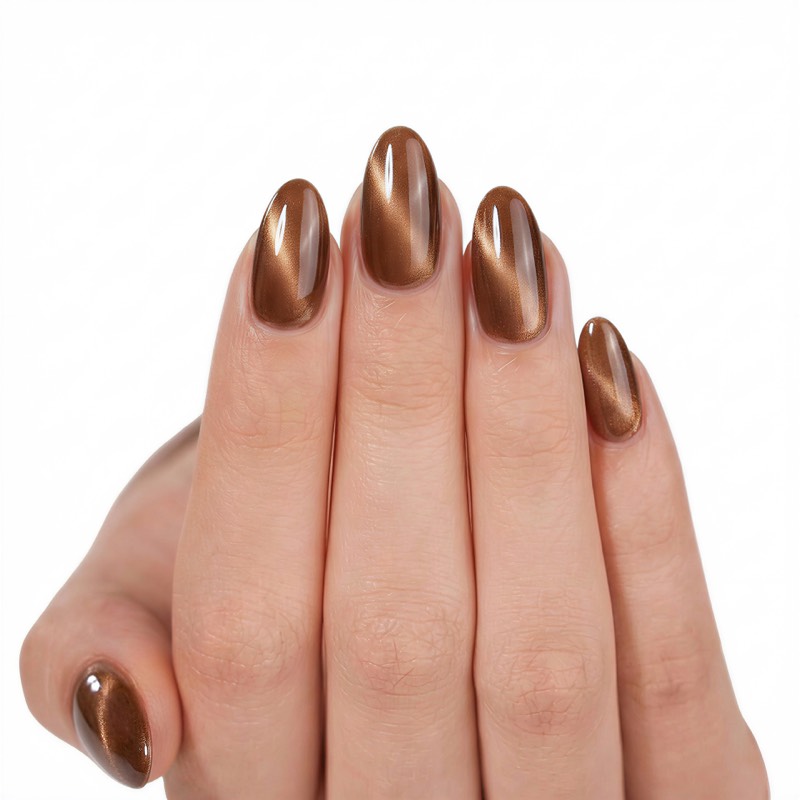
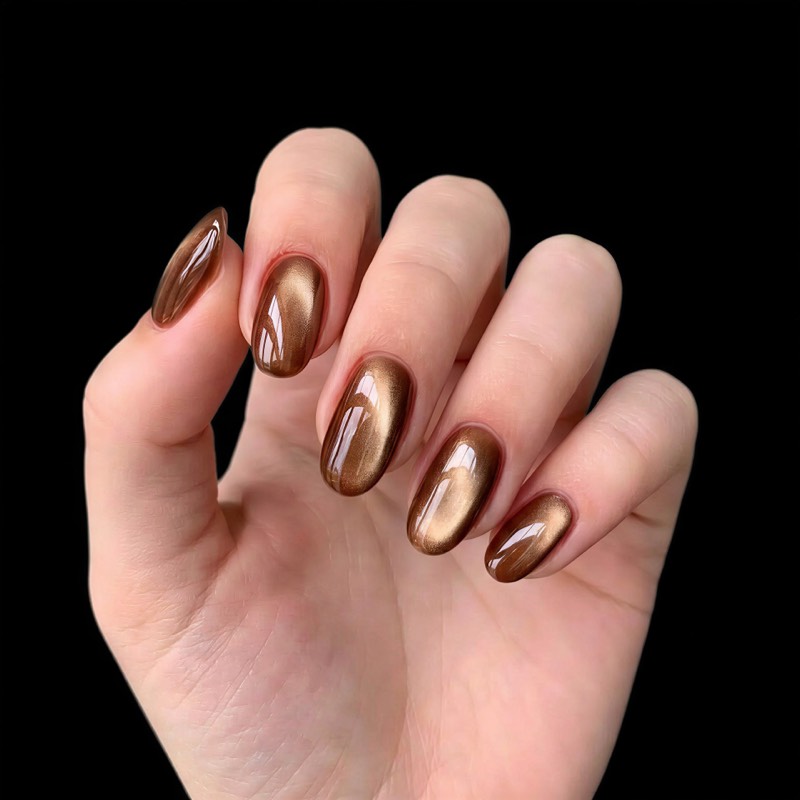
Here's what the AI generates from a single nail design photo — multiple poses and backgrounds, all in one session:
Before & After
Multiple Poses from One Upload
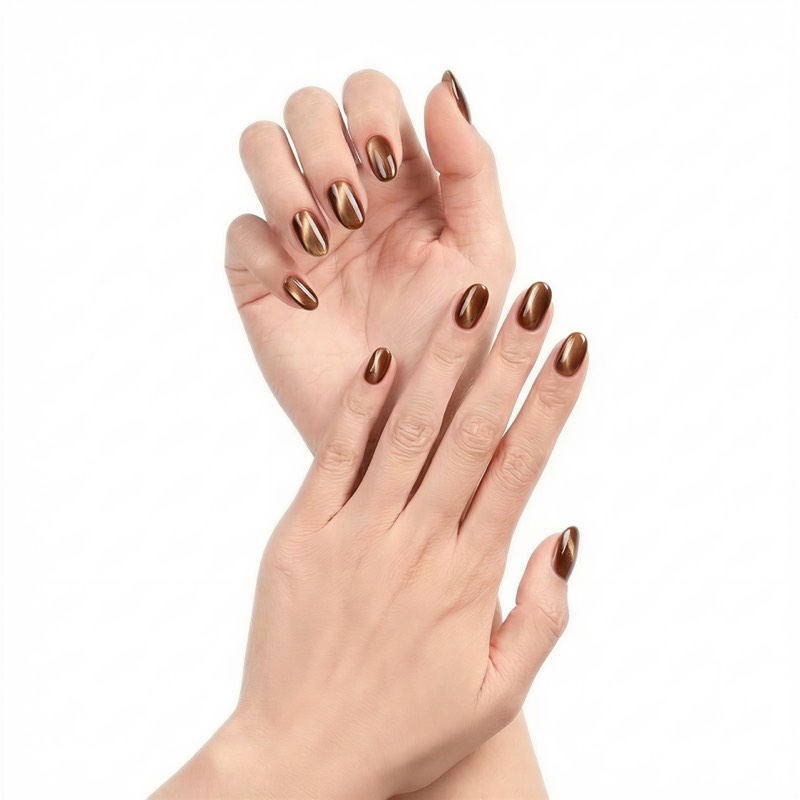
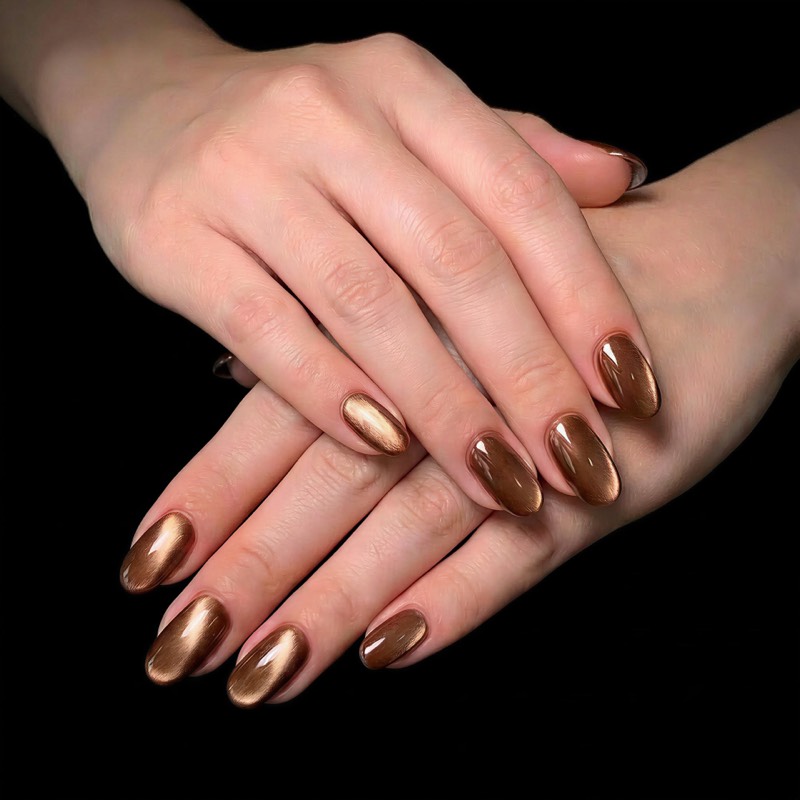
Generate variety for your product listings without a reshoot:
Tips for the Best Results
- Lighting matters: Use natural or even lighting when photographing your nails. Avoid harsh shadows.
- Plain background: A white or light-colored background helps the AI cleanly separate your nail design.
- Show the full design: Lay out all nails so each one is fully visible, with a bit of space between them.
- Mix backgrounds: Try both white and dark backgrounds to see which works better for your brand.
- Use multiple poses: Listings with 4+ product photos get significantly more clicks on Etsy and TikTok Shop.
Why AI Product Photos?
Traditional press-on nail photography requires a hand model, photographer, good lighting setup, and post-processing. That's hundreds of dollars per shoot, and days of turnaround time.
With AI-generated photos, you can create listing-ready images in under 2 minutes for a fraction of the cost. This is especially valuable when you're launching new designs frequently and need to keep your store fresh.
Want to know which photo types your listing needs? Read our complete listing photo guide. Got multiple designs? Learn how to batch generate product photos for your entire catalog.
Frequently Asked Questions
Under 2 minutes. Upload your nail design photo, choose your settings (skin tone, hand pose, background), and the AI generates professional product photos in seconds. You can create multiple poses in a single session.
Use a clear, well-lit photo of your press-on nails on a plain background (white or light-colored works best). Lay out all nails so each one is fully visible with a bit of space between them. Avoid harsh shadows and busy backgrounds.
Yes. AI-generated product photos are accepted on all major e-commerce platforms including Etsy, TikTok Shop, Amazon, Instagram, and Shopify. They are high-resolution and listing-ready — no additional editing needed.
AI nail photography saves 80–95% compared to traditional product photography, which requires a hand model, photographer, studio setup, and post-processing. With Try My Nails, you can create your first product photo for free.
Cách Tạo Ảnh Sản Phẩm Móng Dán Bằng AI
Bạn đang bán móng dán online? Ảnh sản phẩm có thể quyết định việc bán hàng thành hay bại. Nhưng thuê người mẫu tay và nhiếp ảnh gia thì tốn kém và mất thời gian. Với Try My Nails, bạn có thể tạo ảnh sản phẩm chuyên nghiệp trong chưa đầy 2 phút — không cần máy ảnh.
Tóm tắt — Tải lên ảnh móng dán của bạn lên Try My Nails, chọn tông da và tư thế tay, AI sẽ tạo ảnh sản phẩm chuyên nghiệp trong chưa đầy 2 phút. Không cần máy ảnh, người mẫu tay hay studio — tiết kiệm 80–95% so với chụp ảnh truyền thống.
Bạn Cần Gì
- Một ảnh rõ nét của mẫu móng dán (trên nền trơn là tốt nhất)
- Tài khoản Try My Nails miễn phí
Hướng Dẫn Từng Bước
Chụp ảnh rõ nét móng dán trên nền sạch. Xếp phẳng để mẫu móng hiển thị đầy đủ.
Chọn tông da, tư thế tay và màu nền. Phối hợp với phong cách thương hiệu hoặc tạo sự đa dạng cho tin đăng.
Nhấn Tạo và AI sẽ đặt mẫu móng lên mẫu tay thực tế. Bạn có thể tạo tối đa 4 tư thế cùng lúc.
Tải ảnh độ phân giải cao sẵn sàng cho tin đăng Etsy, TikTok Shop, Instagram hoặc bất kỳ nền tảng thương mại điện tử nào.
Xem Kết Quả
Đây là những gì AI tạo ra từ một ảnh mẫu móng — nhiều tư thế và nền, tất cả trong một phiên:
Trước & Sau
Nhiều Tư Thế Từ Một Ảnh Tải Lên
Tạo sự đa dạng cho tin đăng sản phẩm mà không cần chụp lại:
Mẹo Để Có Kết Quả Tốt Nhất
- Ánh sáng quan trọng: Sử dụng ánh sáng tự nhiên hoặc đều khi chụp ảnh móng. Tránh bóng đổ mạnh.
- Nền trơn: Nền trắng hoặc màu sáng giúp AI tách mẫu móng rõ ràng hơn.
- Hiển thị đầy đủ mẫu: Xếp tất cả các móng sao cho mỗi chiếc đều nhìn thấy rõ, có khoảng cách giữa chúng.
- Thử nhiều nền: Thử cả nền trắng và nền tối để xem loại nào phù hợp hơn với thương hiệu của bạn.
- Dùng nhiều tư thế: Tin đăng có 4+ ảnh sản phẩm được nhấp chuột nhiều hơn đáng kể trên Etsy và TikTok Shop.
Tại Sao Nên Dùng Ảnh Sản Phẩm AI?
Chụp ảnh móng dán truyền thống cần người mẫu tay, nhiếp ảnh gia, bộ đèn chiếu sáng và hậu kỳ. Chi phí hàng trăm đô la mỗi buổi chụp và mất nhiều ngày.
Với ảnh tạo bằng AI, bạn có thể tạo ảnh sẵn sàng đăng bán trong chưa đầy 2 phút với chi phí rất nhỏ. Điều này đặc biệt hữu ích khi bạn ra mẫu mới thường xuyên và cần cập nhật shop liên tục.
Muốn biết tin đăng cần những loại ảnh nào? Đọc hướng dẫn ảnh đăng bán đầy đủ. Có nhiều mẫu? Tìm hiểu cách tạo ảnh sản phẩm hàng loạt cho toàn bộ catalog.
Câu Hỏi Thường Gặp
Dưới 2 phút. Tải lên ảnh mẫu móng, chọn cài đặt (tông da, tư thế tay, nền) và AI sẽ tạo ảnh sản phẩm chuyên nghiệp trong vài giây. Bạn có thể tạo nhiều tư thế trong một phiên.
Sử dụng ảnh rõ nét, đủ sáng của móng dán trên nền trơn (trắng hoặc màu sáng là tốt nhất). Xếp tất cả các móng sao cho mỗi chiếc đều nhìn thấy rõ với khoảng cách giữa chúng. Tránh bóng đổ mạnh và nền rối.
Có. Ảnh sản phẩm tạo bằng AI được chấp nhận trên tất cả các nền tảng thương mại điện tử lớn bao gồm Etsy, TikTok Shop, Amazon, Instagram và Shopify. Ảnh có độ phân giải cao và sẵn sàng đăng bán — không cần chỉnh sửa thêm.
Chụp ảnh móng bằng AI tiết kiệm 80–95% so với chụp ảnh sản phẩm truyền thống, vốn cần người mẫu tay, nhiếp ảnh gia, studio và hậu kỳ. Với Try My Nails, bạn có thể tạo ảnh sản phẩm đầu tiên miễn phí.
Cómo Crear Fotos de Productos de Uñas Postizas con IA
¿Vendes uñas postizas en línea? Tus fotos de productos pueden determinar una venta. Pero contratar una modelo de manos y un fotógrafo es costoso y lento. Con Try My Nails, puedes generar fotos de productos profesionales en menos de 2 minutos — sin cámara necesaria.
Resumen — Sube una foto de tus uñas postizas a Try My Nails, elige un tono de piel y pose de mano, y la IA genera fotos de productos profesionales en menos de 2 minutos. Sin cámara, modelo de manos ni estudio — ahorrando 80–95% vs. fotografía tradicional.
Qué Necesitas
- Una foto clara de tu diseño de uñas postizas (sobre fondo liso funciona mejor)
- Una cuenta gratuita de Try My Nails
Tutorial Paso a Paso
Toma una foto clara de tus uñas postizas sobre un fondo limpio. Colócalas planas para que el diseño sea completamente visible.
Selecciona un tono de piel, pose de mano y color de fondo. Combina con la estética de tu marca o crea variedad para tus listados.
Haz clic en Generar y la IA coloca tu diseño de uñas en modelos de manos realistas. Puedes generar hasta 4 poses diferentes a la vez.
Descarga fotos de alta resolución listas para tus listados de Etsy, TikTok Shop, publicaciones de Instagram o cualquier plataforma de comercio electrónico.
Ver los Resultados
Esto es lo que la IA genera a partir de una sola foto de diseño de uñas — múltiples poses y fondos, todo en una sesión:
Antes y Después
Múltiples Poses desde Una Sola Foto
Genera variedad para tus listados de productos sin volver a fotografiar:
Consejos para los Mejores Resultados
- La iluminación importa: Usa luz natural o uniforme al fotografiar tus uñas. Evita sombras fuertes.
- Fondo liso: Un fondo blanco o de color claro ayuda a la IA a separar limpiamente tu diseño de uñas.
- Muestra el diseño completo: Coloca todas las uñas de modo que cada una sea completamente visible, con algo de espacio entre ellas.
- Mezcla fondos: Prueba tanto fondos blancos como oscuros para ver cuál funciona mejor para tu marca.
- Usa múltiples poses: Los listados con 4+ fotos de productos obtienen significativamente más clics en Etsy y TikTok Shop.
¿Por Qué Fotos de Productos con IA?
La fotografía tradicional de uñas postizas requiere una modelo de manos, fotógrafo, configuración de iluminación y postproducción. Eso son cientos de dólares por sesión y días de tiempo de espera.
Con fotos generadas por IA, puedes crear imágenes listas para publicar en menos de 2 minutos por una fracción del costo. Esto es especialmente valioso cuando lanzas nuevos diseños frecuentemente y necesitas mantener tu tienda actualizada.
¿Quieres saber qué tipos de fotos necesita tu listado? Lee nuestra guía completa de fotos para listados. ¿Tienes múltiples diseños? Aprende a generar fotos de productos en lote para todo tu catálogo.
Preguntas Frecuentes
Menos de 2 minutos. Sube la foto de tu diseño de uñas, elige tus ajustes (tono de piel, pose de mano, fondo) y la IA genera fotos de productos profesionales en segundos. Puedes crear múltiples poses en una sola sesión.
Usa una foto clara y bien iluminada de tus uñas postizas sobre un fondo liso (blanco o color claro funciona mejor). Coloca todas las uñas de modo que cada una sea completamente visible con algo de espacio entre ellas. Evita sombras fuertes y fondos recargados.
Sí. Las fotos de productos generadas por IA son aceptadas en todas las principales plataformas de comercio electrónico incluyendo Etsy, TikTok Shop, Amazon, Instagram y Shopify. Son de alta resolución y listas para publicar — no necesitan edición adicional.
La fotografía de uñas con IA ahorra un 80–95% comparada con la fotografía de productos tradicional, que requiere modelo de manos, fotógrafo, estudio y postproducción. Con Try My Nails, puedes crear tu primera foto de producto gratis.
¿Listo para Probarlo?
Crea tu primera foto de producto con IA gratis — sin tarjeta de crédito requerida.
Pruébalo Gratis